Celebrate the Class of 2026 with Standout SVG Designs
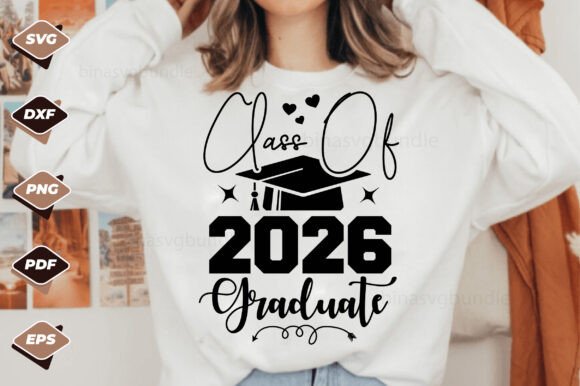
Graduation season brings a unique kind of excitement—a blend of pride, nostalgia, and anticipation for the future. For designers, crafters, and small business owners, it also presents a prime opportunity to create meaningful, market-ready products. If you're looking for a versatile, layered design asset that captures this milestone, the Class of 2026 Graduate SVG Design offers a creative springboard. This isn't just a single image; it's a complete digital toolkit crafted to help you produce professional, cohesive projects with ease.
What Exactly Is This Design Package?
At its core, this is a word-by-layer SVG file, meaning each text element and graphic component is separated into its own editable layer. This structure is a game-changer for customization. Instead of wrestling with a single, flattened image, you can isolate and modify individual parts—change colors, resize specific elements, or rearrange the composition to fit your exact vision. The download includes a .zip file containing five essential file formats: an SVG file (optimized for Cricut and other cutting machines), an EPS file (a fully editable vector), a PNG file (high-resolution with a transparent background), a DXF file (for CAD software), and a PDF file (which can serve as an Adobe Illustrator source). This comprehensive format selection ensures compatibility across a wide range of design software and production methods, from screen printing to vinyl cutting.
Practical Applications for Real-World Projects
The true value of a design asset like this lies in its adaptability. Think beyond a simple graduation card. This Class of 2026 theme can be woven into a variety of commercial and personal projects.
- Merchandise & Product Design: Create bestselling items for an Etsy shop or local craft fair. The layered design works beautifully on t-shirts, tote bags, and hoodies. It's equally effective for mugs, water bottles, and phone cases, where the clear, bold typography stands out.
- Event Branding & Decor: Design a cohesive look for graduation parties. Use the SVG to cut vinyl decals for signs, banners, and centerpiece decorations. The PNG version is perfect for printing on invitations, programs, and thank-you cards.
- Digital Content & Marketing: Social media managers and bloggers can leverage the design for eye-catching graphics. Create Instagram stories, Facebook posts, or Pinterest pins celebrating graduates. The transparent PNG makes it easy to overlay on photos or colored backgrounds.
- Small Business Branding: For businesses catering to graduates—like gift shops, bakeries, or photography studios—this design can become part of a seasonal brand identity. Use it on packaging, loyalty cards, or website banners to create a timely, relevant promotion.
Enhancing Your Design Workflow and Output
Using a well-structured, layered file like this SVG can significantly streamline your creative process and elevate the final product. The separation of elements allows for precise control, which is crucial for professional results. You can ensure visual consistency across all your projects by maintaining the same color scheme and layout adjustments. This consistency is key to building brand recognition, especially if you're selling a line of graduation products.
The vector nature of the SVG and EPS files means your designs are infinitely scalable. Whether you're putting the graphic on a small enamel pin or a large graduation banner, the lines remain crisp and the text stays perfectly readable. This scalability is a non-negotiable for anyone creating logo designs or packaging where quality cannot be compromised. Furthermore, having a high-resolution PNG with a transparent background is invaluable for quick mockups, digital layouts, and integrating the design into complex compositions without worrying about awkward white boxes.
Tips for Integrating This Design into Your Projects
To get the most out of this asset, consider a few practical strategies. First, think about your font pairing. While the design includes its own typography, you might want to complement it with other typefaces for supporting text. A clean, modern sans-serif font often pairs well for body text, creating a balanced hierarchy. If the design has a script or handwritten element, ensure any additional text doesn't compete for attention.
Second, always consider your medium. The layered SVG is perfect for Cricut and Silhouette projects, where you might cut different layers from different colored vinyl. For print-on-demand services, the PNG's 300 DPI resolution ensures sharp prints. When using the design for web graphics, optimize the file size without losing quality to maintain fast page load speeds.
Finally, review the licensing. Since this is a digital download for commercial use, you can confidently incorporate it into products you sell. However, it's good practice to check the specific terms—most licenses allow for selling finished physical goods but prohibit reselling the digital file itself. This makes it a fantastic design asset for entrepreneurs looking to expand their product line with minimal upfront design cost.
The Class of 2026 Graduate SVG Design is more than just clip art; it's a versatile foundation for countless creative ventures. By leveraging its layered structure and multiple file formats, you can efficiently produce polished, market-ready items that resonate with graduates and their families, all while maintaining a high standard of professional presentation in your work.